
Tracking Numbers & Attribution in CallGauge AI
Learn how tracking numbers, number pools and Dynamic Number Insertion help you measure inbound calls and connect them with the marketing sources that generated them.
Understanding Call Tracking
Tracking numbers are the foundation of call tracking in CallGauge AI. They allow you to measure inbound calls, identify where they came from and review the marketing activity connected with each conversation. Choose a single tracking number for a fixed source or a number pool when using Dynamic Number Insertion on your website.
Tracking numbers
Measure calls from a fixed campaign, channel or marketing source.
Number pools
Support visitor-level website attribution through Dynamic Number Insertion.
Call attribution
Identify the source, campaign and other supported marketing data connected with each call.
Call reporting
Review call activity, recordings and attribution information in one workspace.
Choose the Right Number Setup
Use a single tracking number for one fixed source. Use a number pool when you need Dynamic Number Insertion for website visitor attribution.
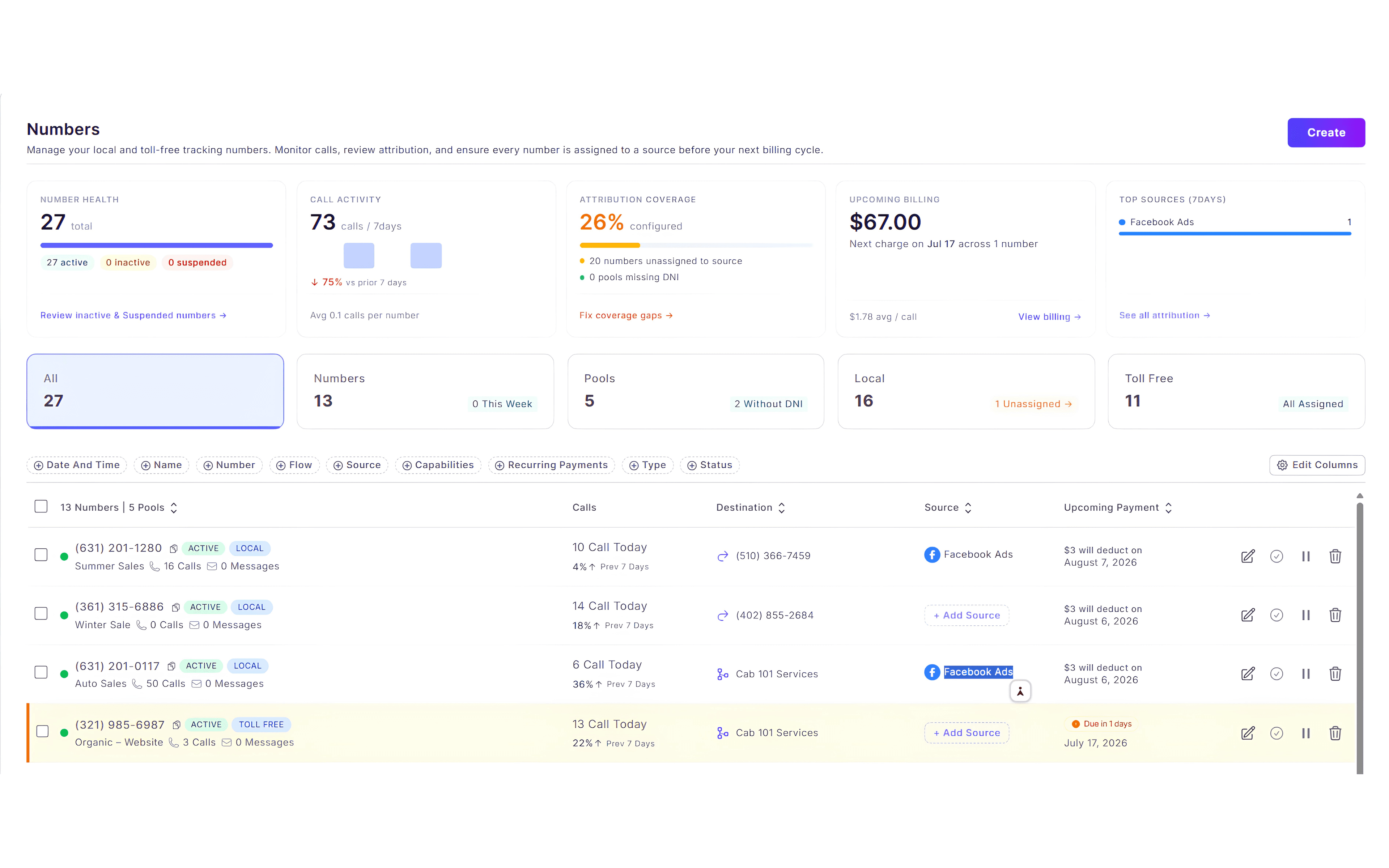
Understand Tracking Numbers
A tracking number is a phone number assigned to a marketing source, campaign or channel. When someone calls it, CallGauge AI records the call and connects it with the source configured for that number.
Best Use
Use one tracking number when you want to measure calls from a fixed source without replacing phone numbers dynamically on your website.
Expected Result
You understand how a single tracking number measures calls from a fixed campaign or source.
Understand Number Pools
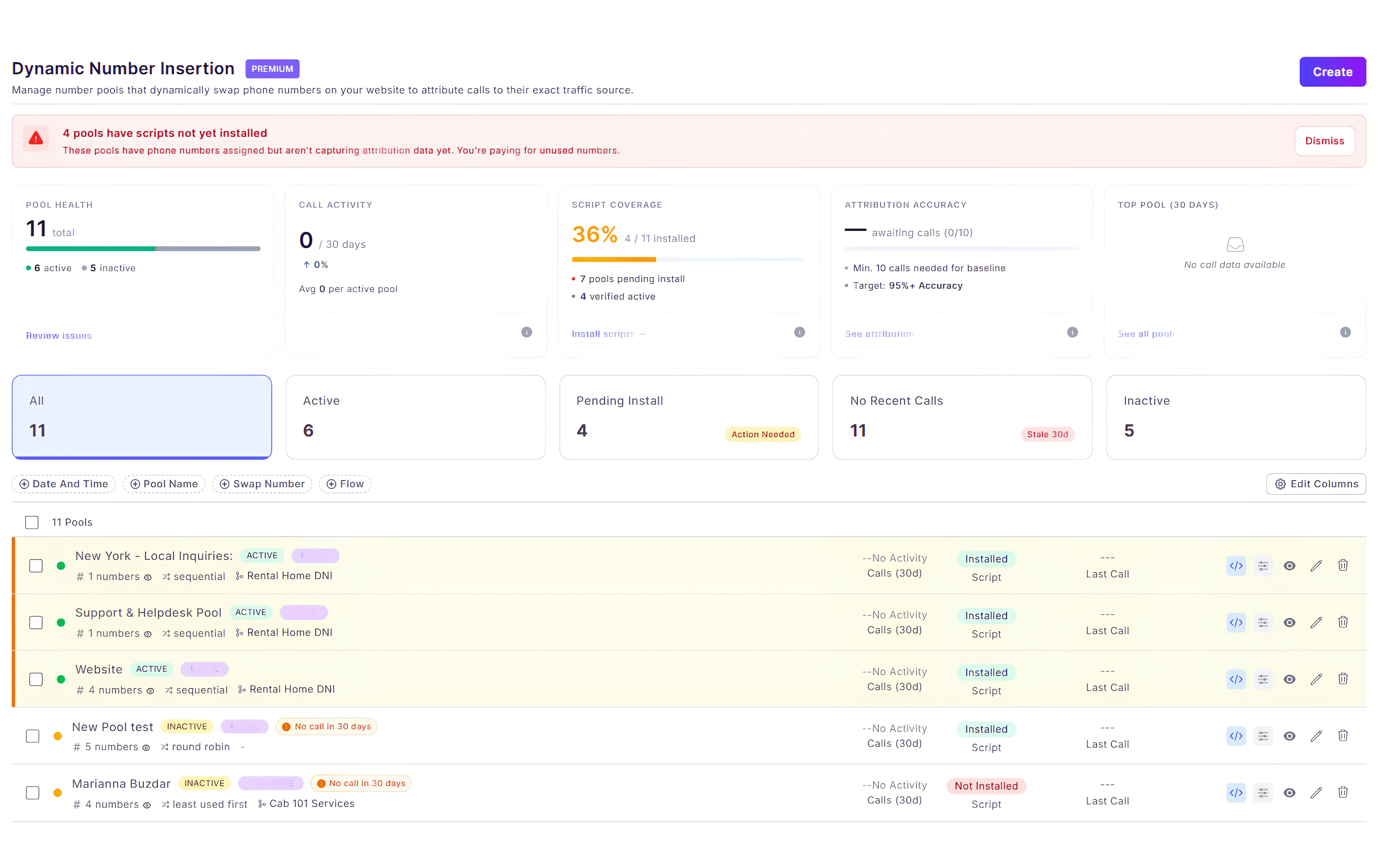
A number pool contains multiple tracking numbers used by Dynamic Number Insertion. CallGauge AI temporarily assigns a number from the pool to a website visitor so the resulting call can be connected with that visitor's session and marketing source.
When a Number Pool Is Required
Purchase a number pool when you want Dynamic Number Insertion and visitor-level website attribution. A pool is not required for a single fixed tracking number.
Expected Result
You understand when to use a number pool instead of a single tracking number.
Configure Dynamic Number Insertion
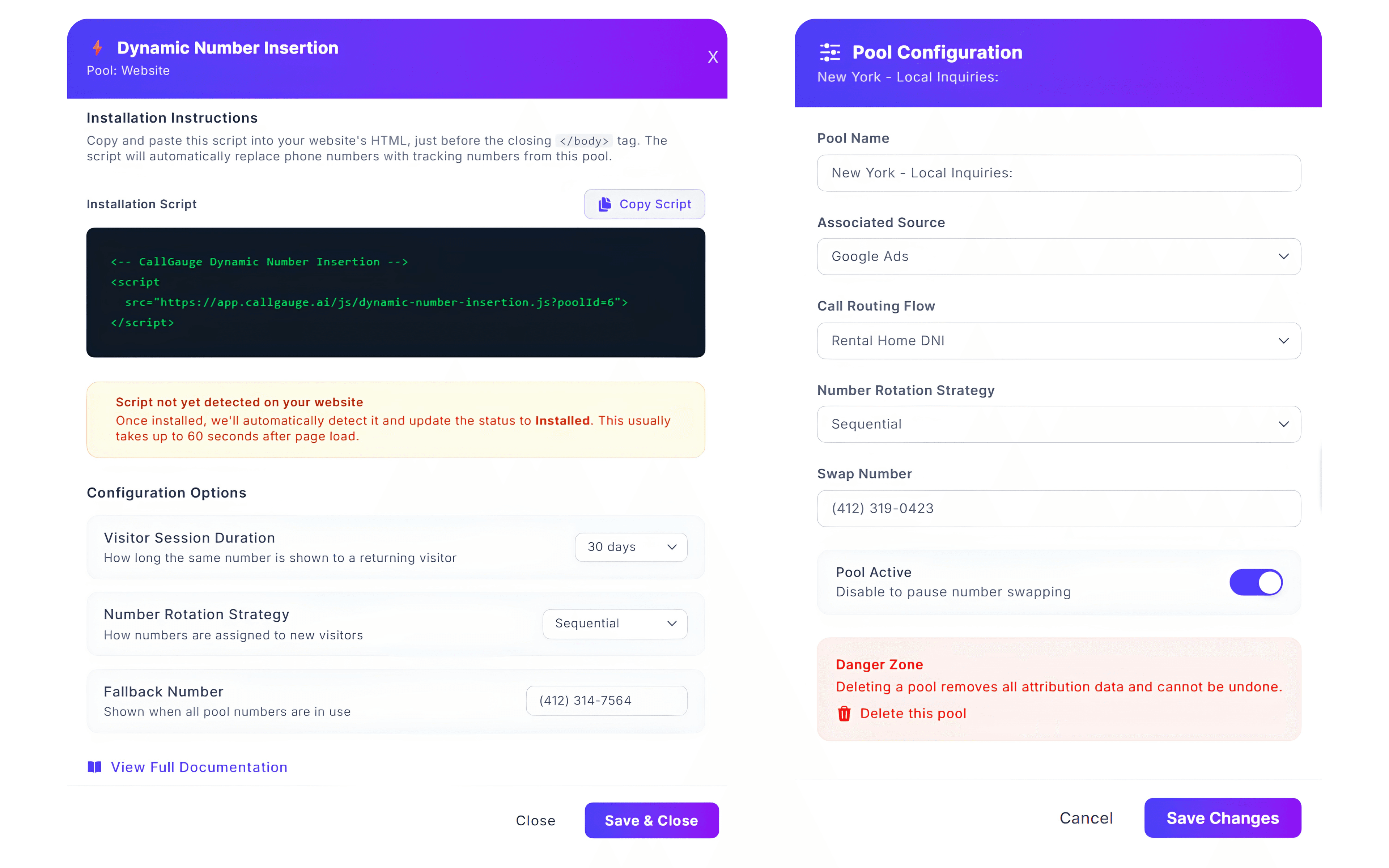
Dynamic Number Insertion replaces the phone number shown on your website with a tracking number from the selected pool. This allows CallGauge AI to connect website calls with supported visitor, campaign and source data.
How It Works
Visitors arriving through supported marketing sources can see tracking numbers from the assigned pool. Calls to those numbers are then connected with available attribution data.
Expected Result
Dynamic Number Insertion is configured to attribute supported website calls.
Understand Call Attribution
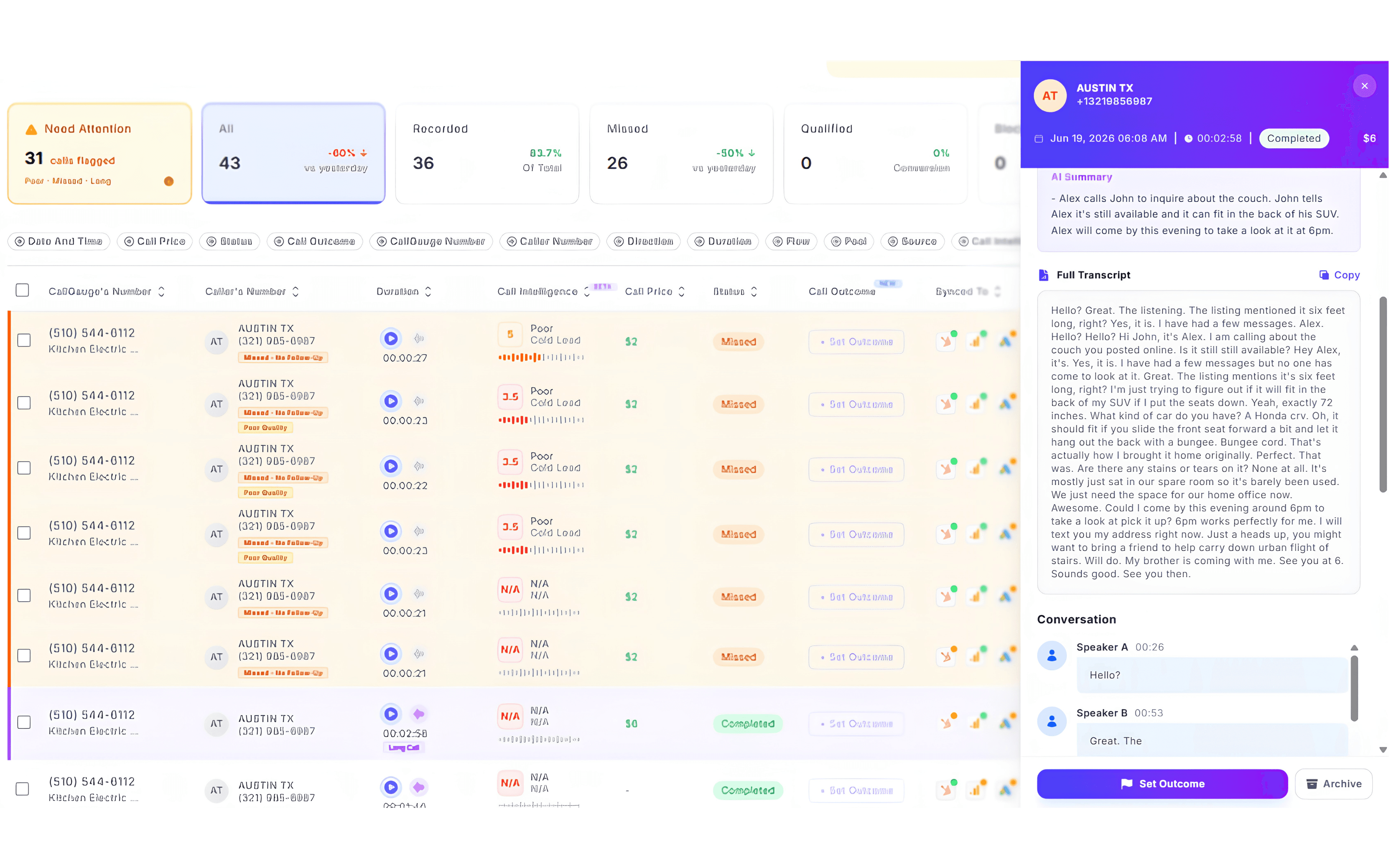
Call attribution connects an inbound phone call with the marketing activity that generated it. The available attribution information depends on the tracking setup, visitor journey and connected integrations.
Attribution Availability
Not every call will contain the same level of attribution detail. The available data depends on the number setup, tracking script, visitor source and connected platforms.
Expected Result
You can identify the available source and campaign information connected with a tracked call.
Review Calls and Attribution
Open the Call Log and select a conversation to review its details. CallGauge AI displays the call activity along with any available AI insights and attribution information captured by your tracking setup.
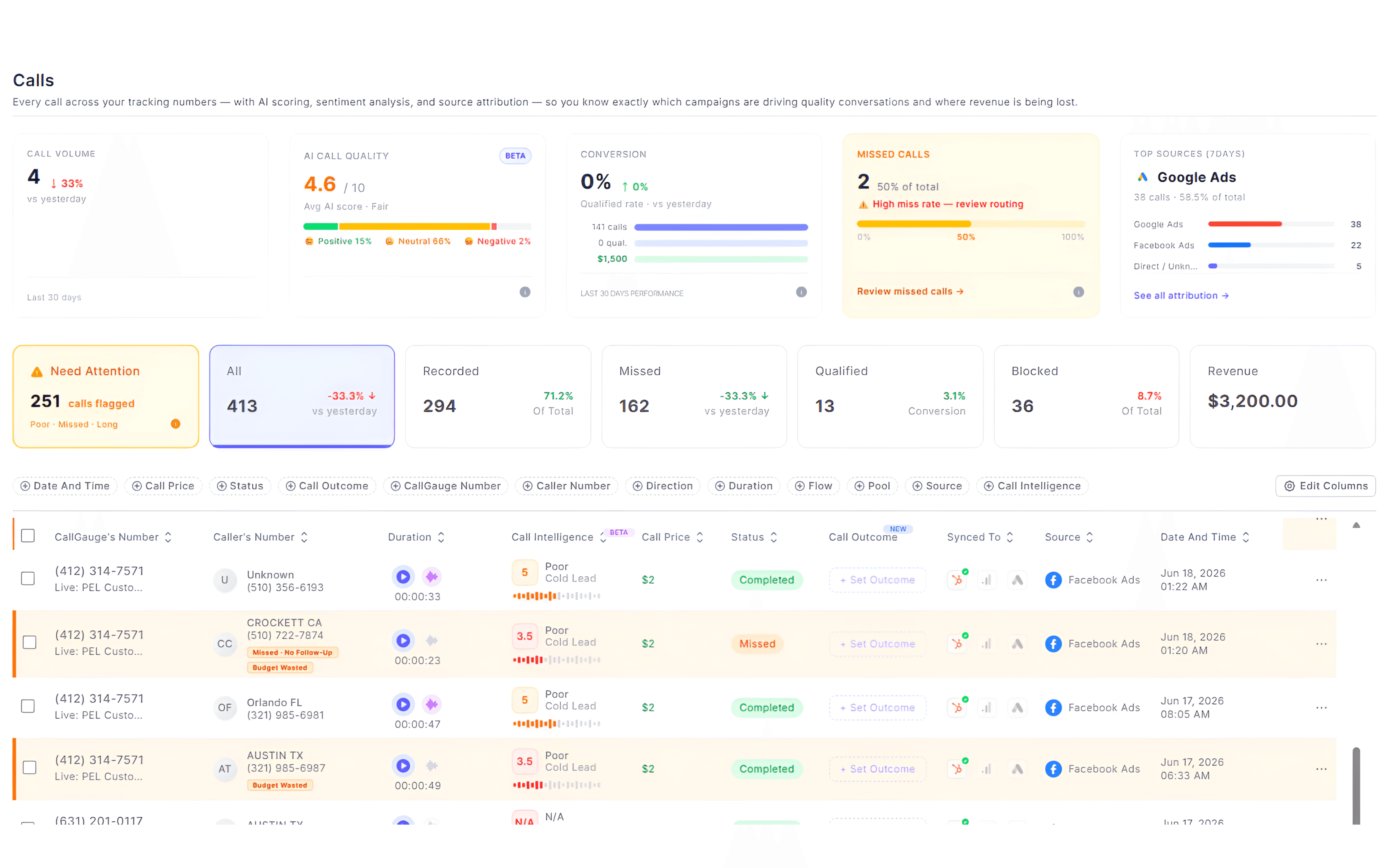
Expected Result
You can open a tracked call and review its available marketing attribution data.
Test Your Tracking and Attribution Setup
Test the setup before relying on it for campaign decisions. Confirm that the correct tracking number appears, calls route through the attached call flow and the resulting call is recorded in CallGauge AI.
Testing Dynamic Number Insertion
Visit the website through a supported source, confirm the displayed number changes and then place the test call during the same session.
Expected Result
Your test call appears in the Call Log with its recording, AI Summary and transcript. If configured, attribution information is also available for review.
Next Steps
Your Tracking Foundation Is Ready
You now understand how tracking numbers, number pools, Dynamic Number Insertion and call attribution work together in CallGauge AI.
Recommended Next Guides
Need help with tracking or attribution?
Contact our support team at support@callgauge.ai.
Contact Our Support Team
Get help with your CallGauge AI account, product setup, integrations or technical questions.