
Call Whispering for Smarter Inbound Conversations
CallGauge AI Call Whispering plays a short private text-to-speech message to the person receiving the call before the caller connects. Give your team instant context about the campaign, client, tracking number or type of call so they can answer with more confidence.
No credit card required · 14-day free trial · Setup in minutes
What Is Call Whispering?
Call whispering is a private pre-call message played only to the person receiving an inbound call before the caller is connected. With CallGauge AI, you can use customizable text-to-speech messages to give your team useful context before every conversation.
Whisper messages are fully customizable, so you can tailor them to your campaigns, clients, call flows and team workflow.
Setup & Control
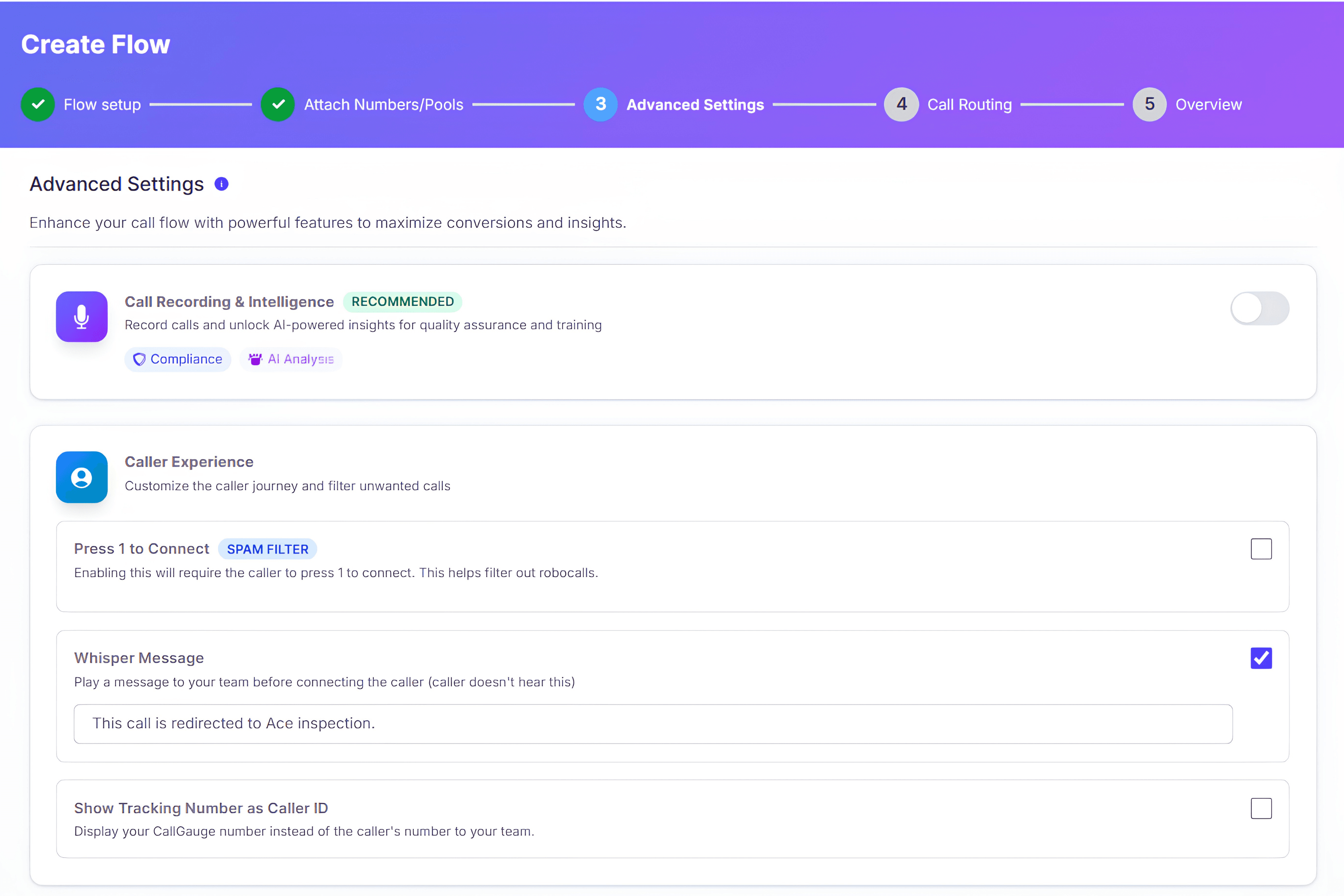
Set Up Call Whispering Step by Step
CallGauge AI lets you add a private whisper message to your inbound call flow in just a few steps. Configure the message in Advanced Settings, customize the text your team should hear and save the flow to activate Call Whispering.
Open Your Call Flow
Choose the call flow where you want to enable Call Whispering.
Open Advanced Settings
Go to Advanced Settings inside the selected call flow.
Enable Whisper Message
Locate the Whisper Message option and switch it on.
Enter Your Custom Message
Add the text-to-speech message your team should hear before the caller connects.
Save the Call Flow
Save your settings to activate the whisper message for future inbound calls.
Once saved, the whisper message plays privately to the person receiving the call before the caller is connected.
Better Call Handling
Why Use Call Whispering?
Call Whispering gives your team useful context before an incoming call connects, helping them understand what the call is about and respond with greater confidence from the first hello.
Improve First Impressions
Give your team useful context before the call connects so they can answer with confidence and create a stronger first impression.
Personalize Conversations
Use a private whisper message to tell the person answering which campaign, client or tracking number the caller came through.
Speed Up Lead Qualification
Prepare your team with relevant call context before the conversation begins so leads can be identified and handled more efficiently.
Reduce Call Handling Confusion
Let your team know what type of call is coming in before they answer, especially when multiple campaigns route to the same person.
Manage Multiple Campaigns
Use different whisper messages for campaigns, tracking numbers or clients so your team knows exactly which call they are receiving.
Create Consistent Call Experiences
Give sales, support and client-facing teams the context they need before answering so calls can be handled more consistently.
Call Whispering for Every Team
Call Whispering gives teams private pre-call context before an inbound conversation begins, helping them understand the caller, campaign or client they are about to handle.
Marketing Agencies
Use client names, campaign labels or tracking-number context so teams can quickly identify which account or marketing source generated the inbound call.
Sales Teams
Prepare sales reps with simple cues such as new PPC lead, high-intent caller or campaign source before the conversation begins.
Support Teams
Provide important handling instructions, customer context or VIP status before the call connects so support teams can respond appropriately.
Multi-Client Teams
Use different whisper messages across client accounts and call flows to keep inbound calls clearly identified and consistently handled.
Give Your Team Context Before Every Call
Set up Call Whispering to play a private message before an inbound call connects, giving your team the context they need to answer with confidence.
No credit card required. 14-day free trial. Setup in minutes.
FAQs - Call Whispering
What is Call Whispering?
Call Whispering is a call routing feature that plays a short private message to the person receiving an inbound call before the caller is connected. It gives your team useful context about the incoming call so they can prepare before starting the conversation.
Does the caller hear the whisper message?
No. The whisper message is private and is played only to the person receiving the call. The caller does not hear the message.
How does Call Whispering work in CallGauge AI?
When an inbound call reaches a call flow with Call Whispering enabled, CallGauge AI plays the configured text-to-speech message to the receiver before connecting the caller. This can provide context about the campaign, client, tracking number or type of call.
Can I customize the Call Whispering message?
Yes. You can create a custom text-to-speech whisper message based on the context your team needs before answering incoming calls.
Can I use different whisper messages for different call flows?
Yes. Each call flow can have its own whisper message, allowing you to provide different context for different campaigns, clients, tracking numbers or call routing workflows.
Where do I configure Call Whispering?
You can configure the whisper message from the Advanced Settings of your call flow. Enter the message you want the receiver to hear and save the updated call flow settings.
Who can benefit from Call Whispering?
Call Whispering is useful for marketing agencies, sales teams, support teams and businesses managing calls from multiple campaigns or clients. It helps the person answering understand the context of an incoming call before the conversation begins.
Does Call Whispering affect the caller experience?
The whisper message is played privately to the call receiver before the conversation begins, so the caller does not hear the message. This gives your team additional context while keeping the caller experience uninterrupted.