
Understand Every Call Without Listening to the Entire Recording
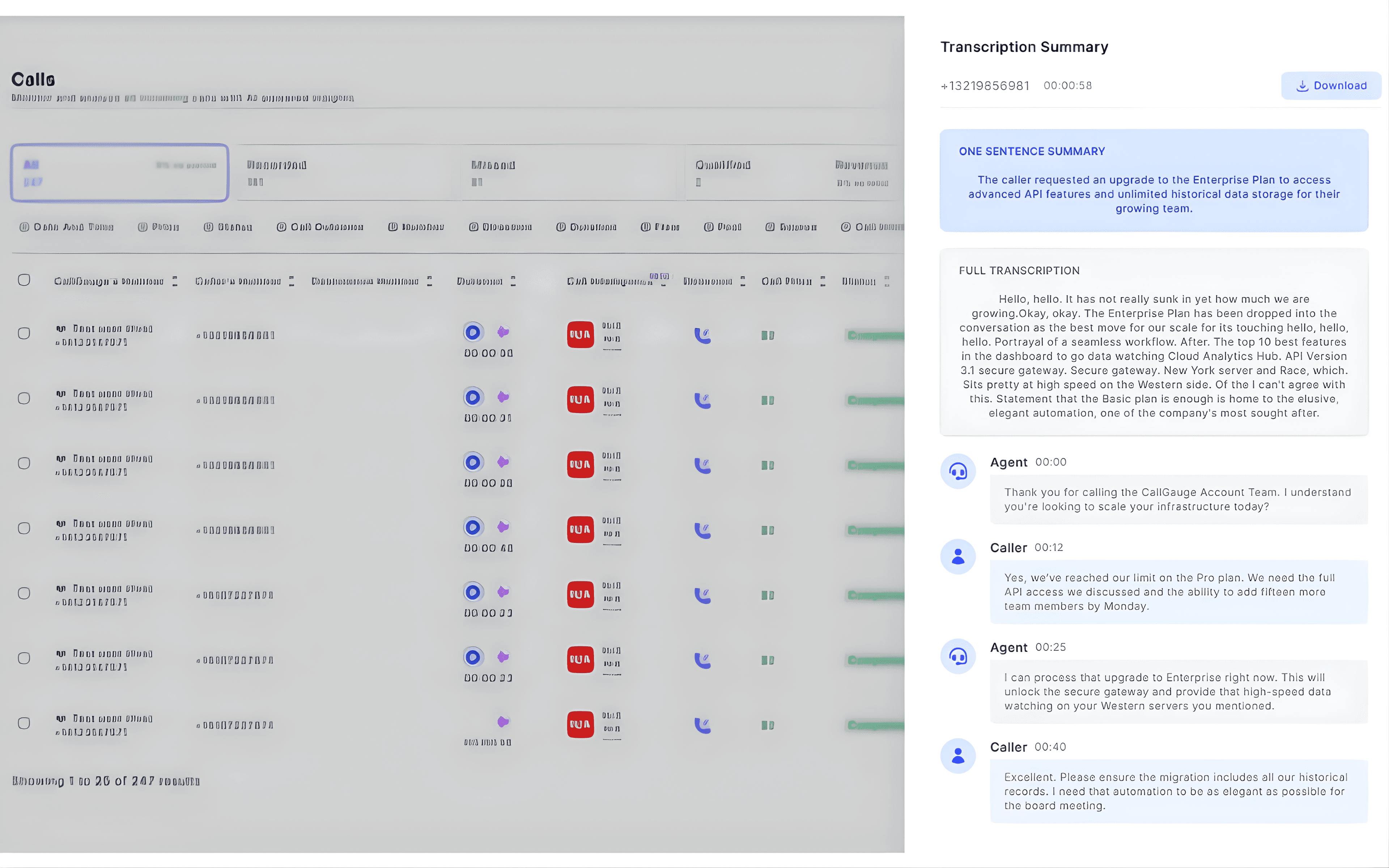
CallGauge AI automatically generates AI call summaries and full call transcripts after each conversation is recorded. Review quickly what happened on the inbound call, identify important discussion points and understand customer conversations without replaying the entire recording.
No credit card required · Automatic call summaries · Setup in minutes
Instant Call Summaries
Automatic summaries after each call
AI Call Transcription
Convert recordings into searchable text
Conversation Insights
Quickly understand key discussion points
Accurate Call Records
Reliable transcripts and call data
AI Call Summaries
Turn Call Conversations Into Quick Insights
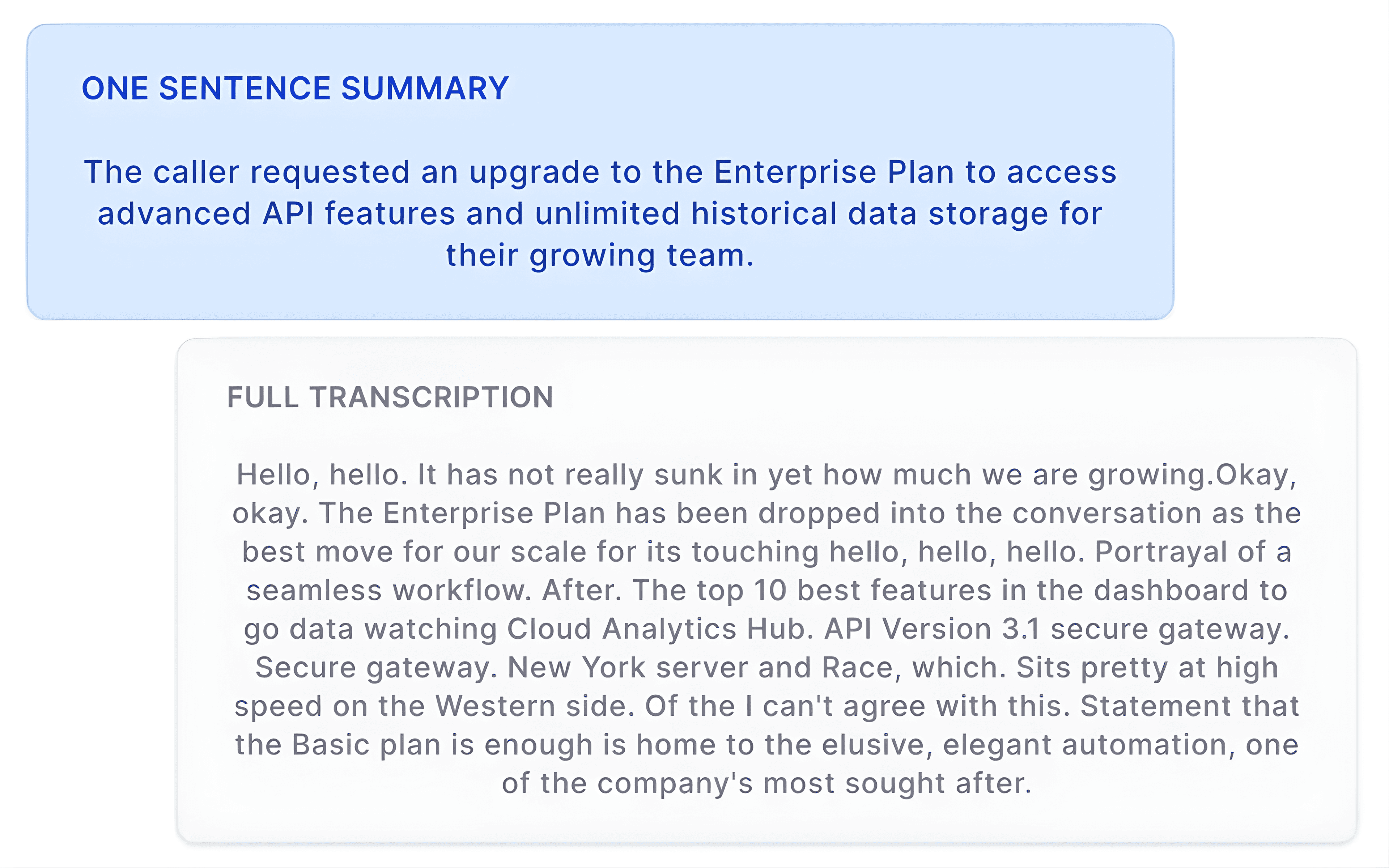
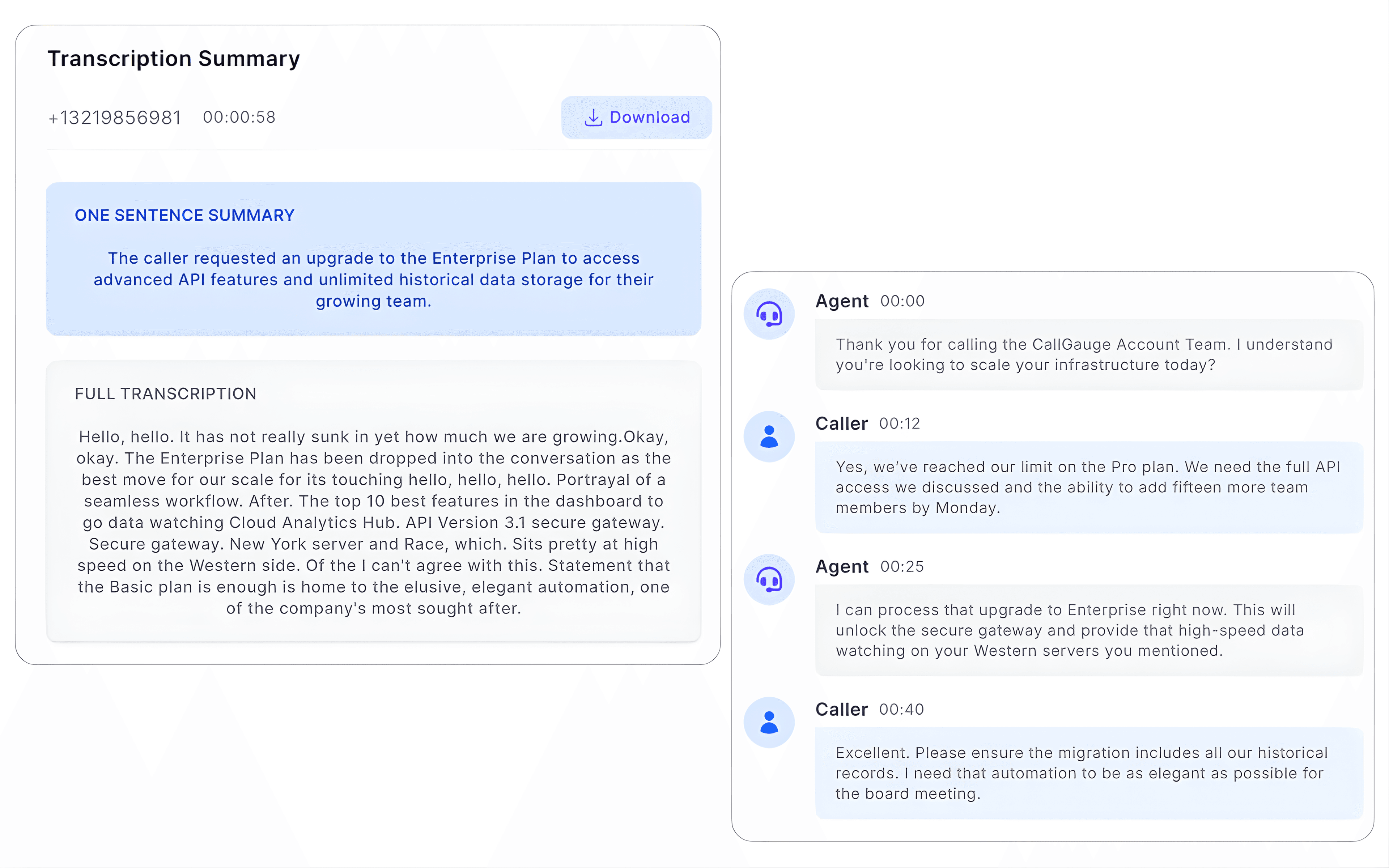
After each recorded call, CallGauge AI generates a short summary that highlights the main discussion points. Instead of listening to the entire conversation, your teams can quickly understand what happened on the inbound call and review important details in seconds.
- Automatic summary generated after each recorded call
- Quickly understand the purpose of the conversation
- Review important discussion points without replaying the entire call
- Access call summaries directly from the call details panel
AI Call Transcription
Convert Every Call Recording Into a Searchable Transcript
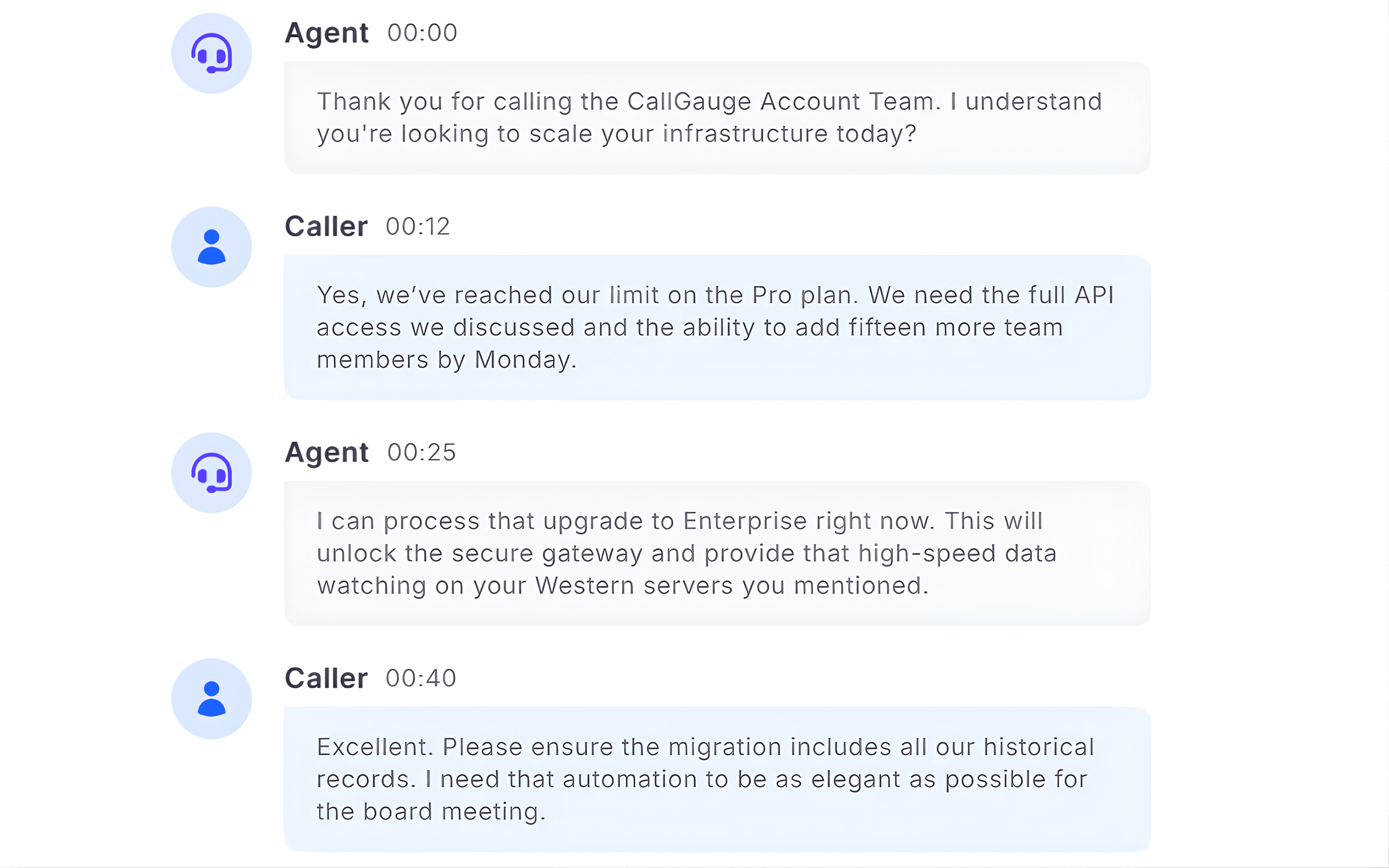
CallGauge AI transcribes recorded phone calls so teams can review conversations in text form. Transcripts make it easier to revisit discussions, locate specific moments in the conversation and document customer interactions.
Automatic Call Transcription
Automatic transcriptions are generated after inbound calls are recorded
Transcript Inside Call Details
Full conversation transcript is available inside call details
Speaker Identification
Speaker identification is available to distinguish between caller and agent
Downloadable Transcripts
Download transcripts for documentation and review
Call Notifications
Get Call Details Delivered to Your Inbox
Stay informed about important business calls without constantly checking the dashboard. CallGauge AI can send you email notifications with key call details after a call is completed, helping your teams to quickly review interactions and stay updated on important business conversations.
Email call details
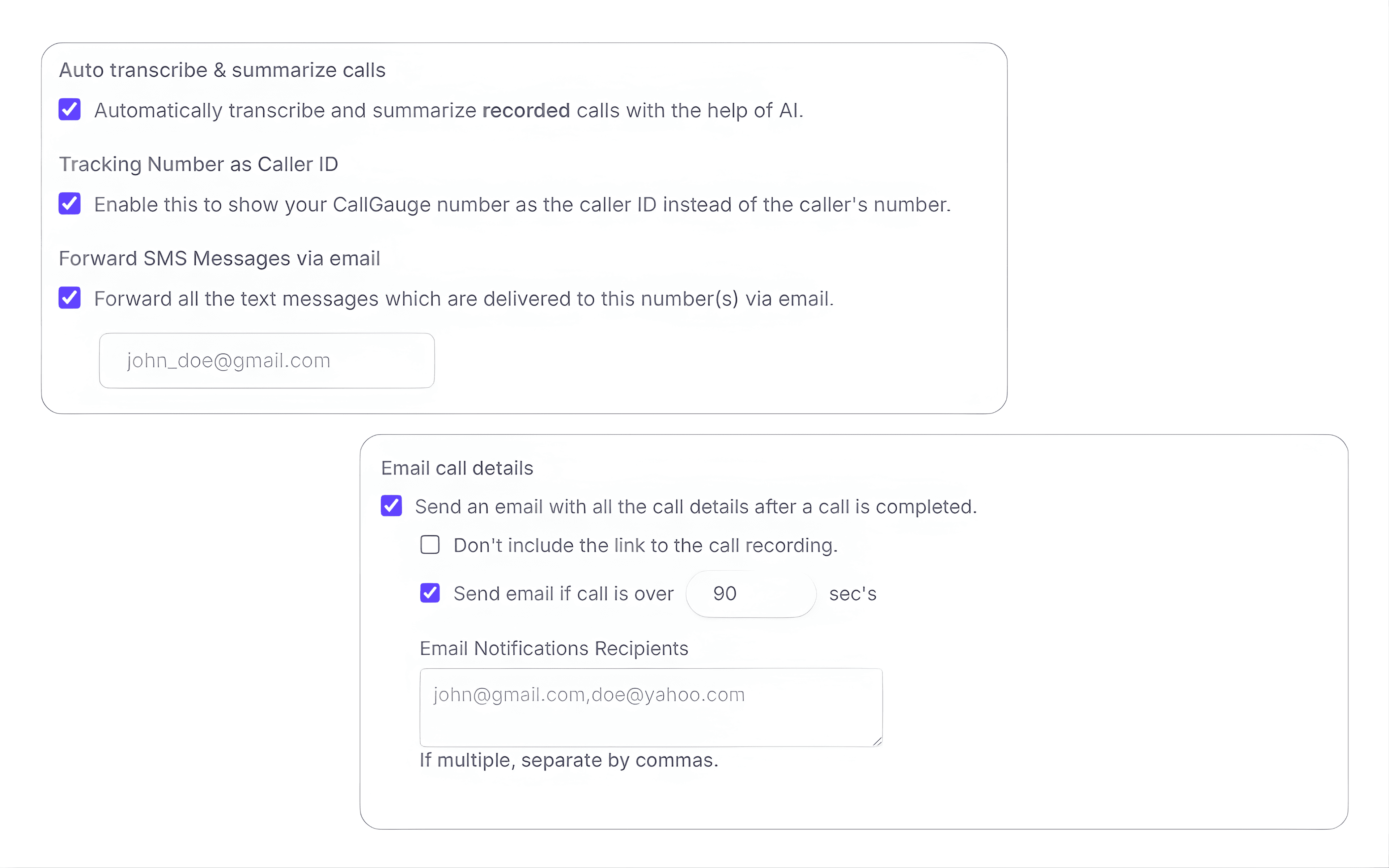
Receive an email with call information and detials once the call finishes so your team can effortlessly review these conversations without opening the dashboard.
Flexible notification rules
Configure these notifications to send only when calls exceed a defined duration so your teams can focus on meaningful and important conversations.
Notify multiple recipients
Add multiple email recipients to ensure sales managers, support teams or stakeholders stay fully informed about important business calls and their details.
Review Conversations Faster
Understand Customer Interactions Without Replay
Instead of replaying your long call recordings, your teams can review call summaries and transcripts to understand these business conversations quickly. This helps your teams to monitor calls, review interactions and capture important details from customer conversations.
Built for Teams
From sales to support, AI call summaries helps every team to better understand conversations and improve outcomes effortlessly.
Sales Teams
Quickly review your customer phone calls and understand what your prospects discussed
Customer Support
Review your customer interactions and follow up on important issues seamlessly
Marketing
Understand your business conversations generated by marketing campaigns
Training
Use real business conversations and transcripts to improve your agent’s performance
Start Understanding Your Calls Faster
Automatically summarize and transcribe calls so your team can review conversations quickly and capture important insights.
No credit card required · Cancel anytime
AI-Based Call Summaries FAQs
How are AI call summaries generated for recorded calls?
CallGauge AI automatically generates a short summary after each inbound call is recorded. The summary highlights the main discussion points of the conversation so teams can quickly understand exactly what happened during the phone call.
Are calls automatically transcribed?
Yes. Recorded calls are automatically converted into text transcripts that can be reviewed any time inside the call details panel.
Can I receive call details by email?
Yes. CallGauge AI can send you an email with call details after a call is completed. Teams can configure these notifications to include call information and optionally include a link to access the call recording.
Are summaries created for every call?
Summaries are basically generated for recorded calls when transcription and summary features are enabled in advanced settings of your call flow.
Do I still have access to the full recording?
Yes. Call summaries and their full transcripts are available alongside the original call recording so teams can easily review the full conversation when needed.